 Norbert Brett

A 100 Lighthouse score on an empty landing page means nothing if your interactive showcase drops to 22fps the moment a user scrolls on a mid-range laptop.
Why a Single Lighthouse Score Never Tells the Whole Story
Business owners and developers love sharing screenshots of four green 100 circles from Google Lighthouse. Don't get me wrong—this portfolio maintains a 98+ Lighthouse performance score, and automated speed checks are a great baseline. But if you have ever visited a website that loaded its top banner in one second and then stuttered or lagged every time you scrolled down or clicked a price toggle, you have experienced what a single Lighthouse number misses.
In Plain English — Web Speed Jargon Decoded:
- Lighthouse: Google's automated lab test that grades a web page from 0 to 100 on speed, accessibility, and SEO. Think of it like checking how fast a restaurant's front door opens—useful, but it stops measuring before you sit down and order.
- SSR (Server-Side Rendering) & Hydration (
__NUXT_DATA__): To make your page show up immediately on phones and in Google search, the server sends a finished HTML page first (SSR), along with a hidden data packet (__NUXT_DATA__) that wakes up the interactive buttons in the browser (Hydration). If that hidden packet is stuffed with unused data, every visitor downloads a heavy invisible backpack.- CLS (Cumulative Layout Shift): That annoying jump when you are about to tap a button on your phone and a slow-loading font or image pushes the text down by half an inch. Our target is
0.00.- INP (Interaction to Next Paint): How many milliseconds pass between tapping a button (like switching
HUFtoEUR) and seeing the screen update. Anything under50msfeels instantaneous to the human eye.
Months earlier, while reviewing a Nuxt application built in 2025 that boasted a 96 Lighthouse score, I was annoyed to discover why mobile users complained it felt sluggish: the homepage was embedding 480 KB of unused blog text inside its hidden __NUXT_DATA__ script tag and forcing the browser to recalculate the height of every card sixty times a second during scroll.
The Four Bottlenecks I Check First in a Nuxt 4 Audit
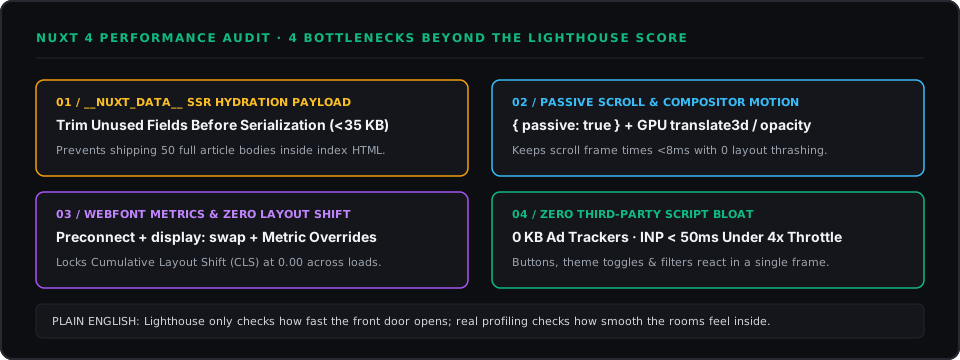
1. Trim the Hidden __NUXT_DATA__ Hydration Payload
When a homepage or blog index fetches articles on the server, a common mistake is loading the entire collection—including 1,500-word article bodies—just to show three preview cards with a title, date, and one-sentence summary. By selecting only the summary fields needed for the card view, we cut the initial HTML payload size by over 75%:
// Bad: Embeds the full text of every article into the index page's hidden HTML data
const { data } = await useAsyncData('notes', () => queryCollection('notes').all())

// Good: Only sends the lightweight card fields needed for the index view
const { data } = await useAsyncData('feed-notes', async () => {
  const rows = await queryCollection('notes').all()
  return rows.map(({ slug, title, category, date, readingTime, image, excerpt, index }) => ({
    slug, title, category, date, readingTime, image, excerpt, index,
  }))
})
2. Keep Scroll Listeners Passive and Animations on the GPU
Across AppNavbar.vue, ProcessSection.vue, and our homepage scroll animations, scrolling drives visual feedback. Two strict rules prevent scroll lag:
- Mark scroll listeners
{ passive: true }: This tells the browser "Go ahead and scroll the screen immediately—you never have to wait for my JavaScript code to finish first." - Animate only
transform: translate3d(...)andopacity: Moving elements withtranslate3druns directly on the device's graphics chip (GPU) in under8msper frame, whereas animatingtop,height, ormarginforces the CPU to re-measure the whole page on every pixel (layout thrashing).
3. Lock Font Metrics so Text Never Jumps (CLS = 0.00)
Custom fonts give a brand character, but loading them carelessly causes text to reflow half a second after the page appears. By preconnecting to the font server in nuxt.config.ts and matching fallback font sizing, text stays locked in place from the first millisecond.
4. Measure Before and After Under Real Throttling
| Bottleneck Checked | How We Measure It | Our Production Target |
|---|---|---|
Hidden HTML Data (__NUXT_DATA__) | Inspect initial HTML document size in Chrome DevTools Network tab | < 35 KB compressed on index pages |
| Scroll Smoothness | Chrome DevTools Performance trace with 4x CPU Slowdown enabled | < 10 ms / frame (60 FPS, zero red long-task bars) |
Button Response Time (INP) | Tap theme, language (EN/HU), and filter buttons under CPU throttling | < 50 ms (4x faster than Google's 200ms threshold) |
| Third-Party Tracker Tax | Audit external network requests on page load | 0 KB of ad trackers or bloated popup scripts |
I felt relieved after running our final production build (pnpm build) and 4x CPU-throttled scroll trace on this site: zero third-party tracking bloat, instant page transitions, and a browser thread that rests at 0% CPU the moment your finger stops scrolling.
Working on something similar?
Tell me about it