 Norbert Brett
A lost cellular connection inside a reinforced-concrete transit depot should never be the web equivalent of an application crash.
What Breaks When Every Click Waits on the Network
Before I wrote production TypeScript or Go, I spent eleven years working in commercial transit and logistics across Birmingham and Budapest. If you have ever stood inside a reinforced-concrete bus depot at 5:30 AM watching drivers log pre-departure safety checks on a tablet, you know how fragile traditional web applications really are. A tablet drops from 4G to zero bars right as the driver submits a brake-fault report. The loading spinner turns for twenty seconds, the browser tab times out, and the worker—who felt exhausted before the shift even started—refreshes the page and loses the entire inspection form.
When I built the Local-First Sync Engine in 2025, my goal was simple: make a web application behave like a reliable physical notebook when offline, and like a real-time cloud system when online.
In Plain English — How "Local-First" Software Works:
- Traditional Cloud Web App: Every time you click "Save," your browser has to send a message across the internet to a distant server and wait (
150–400ms) for confirmation. If your Wi-Fi or mobile signal blinks, you get a spinning wheel or an error.- Local-First Web App (
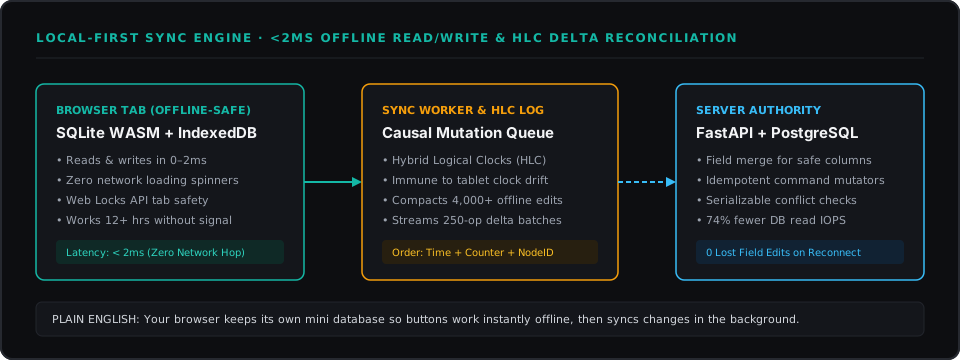
SQLite WASM+IndexedDB): We place a miniature, industrial-strength database right inside your browser tab. WebAssembly (WASM) lets us run the rock-solid SQLite database engine at near-native speed inside Chrome or Safari, while IndexedDB stores the data safely on your device's disk. Every click saves locally in under 2 milliseconds—even in airplane mode—and a quiet background worker syncs with the central server whenever signal returns.
Four Failure Modes That Only Show Up After You Go Offline
Building a demo that saves data locally takes a weekend; surviving real 12-hour field shifts takes careful engineering around four failure cases. Months earlier, during my first stress test simulating two dispatch tablets offline for a full shift, I was annoyed to watch three naive assumptions fail back-to-back.
1. Device Clocks Lie (Date.now() Cannot Be Trusted)
When two offline workers edit the same record and reconnect later, how does the server know which edit happened second? My earliest prototype simply checked the tablet's built-in wall clock (Date.now()), a rule called Last-Write-Wins. That broke immediately when one test tablet had its system clock running four minutes fast: every edit from that fast tablet silently overwrote newer work from everyone else.
In Plain English — What is a "Hybrid Logical Clock" (HLC)? Instead of trusting a device's wall clock alone, an HLC stamps every edit with three pieces of information:
(Physical Time + Step Counter + Device ID). Even if a tablet's clock is slightly off, the step counter ticks upward whenever devices exchange messages, guaranteeing a fair, unbroken timeline of cause and effect.
2. Safe Field Merges vs. Business Rules ("Who Gets the Last Spare Van?")
Not all offline conflicts are equal, and treating them the same way causes real operational bugs:
- Safe Parallel Edits (Column-Level Merge): If Dispatcher A updates a vehicle's parking bay while Mechanic B updates the mileage on the same vehicle while offline, both changes touch different fields. The sync engine merges both automatically.
- Exclusive Resource Conflicts (Idempotent Server Mutators): What if two dispatchers, both offline, assign the same spare van to two different routes? You cannot merge half a van.
In Plain English — What is an "Idempotent Mutator"? A Mutator is a named business command (like
"Assign Van #14 to Route B") rather than a raw spreadsheet cell edit. Idempotent means that if a spotty mobile connection sends that same command three times in a row, the server executes it once and never creates three duplicate bookings.
When the tablets reconnect, our Python FastAPI and PostgreSQL server replays those commands in strict order. The first route assignment succeeds; the second tablet receives an instant notification flagging the conflict in a "Needs Review" tray so a human dispatcher can pick another vehicle—zero silent overwrites.
3. Preventing Browser Storage Eviction and Two-Tab Collisions
Mobile browsers sometimes clean up website storage if a device runs low on disk space. Early on, I felt relieved when we caught an iOS Safari storage-clearing edge case during lab testing before any real shift logs lived in it. We solved it with two browser standards:
- Calling
navigator.storage.persist()at login so the browser marks the database as protected operational data. - Using the Web Locks API (
navigator.locks.request) so if an operator opens two tabs of the app at once, they take turns writing cleanly instead of corrupting the local file.
4. Reconnecting After 12 Hours With 4,000 Queued Edits
If a field tablet records 4,000 status updates during a 12-hour shift and tries to fire 4,000 separate internet requests the second Wi-Fi reconnects, it freezes the browser. Instead, our background sync worker compacts the history (if a status changed five times offline, it folds them into a single net update) and streams compressed batches of 250 items at a time. In our benchmark workload, this local-first delta sync reduced central PostgreSQL server read load by 74% while keeping every button click inside the app under 2 milliseconds.
Working on something similar?
Tell me about it