 Norbert Brett

Running a managed Postgres instance and an auth server just to publish ten technical essays a year is operational cosplay.
Why Git-Backed Markdown Fits Technical Studios and Small Businesses
If you have ever returned to a company blog or portfolio after six months only to find that the cloud database paused itself due to inactivity, a plugin update broke the login screen, or a hosted CMS doubled its monthly subscription fee, you have paid the hidden tax of running a live database for static articles. Years ago, I was annoyed when a five-article engineering blog I maintained went offline on a Sunday morning simply because a managed database rotated its connection credentials during a maintenance window.
When I built the Studio Notes publishing system for this Nuxt 4 portfolio, I wanted both engineering reliability and easy browser editing—without running a separate database server.
In Plain English — What Are Markdown, Frontmatter, and Git-Backed Content?
- Markdown (
.md): Clean, human-readable text files where#makes a heading and**bold**makes bold text. Even 20 years from now, any text editor on any computer can open a Markdown file—zero vendor lock-in.- Frontmatter: A neat block of key-value labels at the very top of an article file (like
title,date,category, andimage) that tells the website how to organize and display the card.- Git-Backed CMS (
@nuxt/content+nuxt-studio): Instead of storing articles in a separate database server that can crash or get hacked, your articles live right inside the website's version-controlled folder (content/notes/*.md). With Nuxt Studio mounted at/_studio, non-technical editors can still log in through their browser, edit text and images visually, and click "Publish" to save changes cleanly to GitHub.
Here is the actual schema contract in content.config.ts that powers the feed you are reading right now:
import { defineContentConfig, defineCollection, z } from '@nuxt/content'

export default defineContentConfig({
  collections: {
    notes: defineCollection({
      type: 'page',
      source: 'notes/*.md',
      schema: z.object({
        index: z.string(),
        slug: z.string().optional(),
        title: z.string(),
        category: z.enum([
          'Visual Philosophy',
          'Engineering Craft',
          'Motion Architecture',
          'Design Systems',
        ]),
        date: z.string(),
        readingTime: z.string(),
        image: z.string(),
        excerpt: z.string(),
      }),
    }),
  },
})
Before any update goes live, our automated test suite (tests/portfolio.test.ts) checks every Markdown file to verify that no title, date, or cover image is missing.
Markdown Files vs. Hosted CMS vs. Custom Database: How to Choose
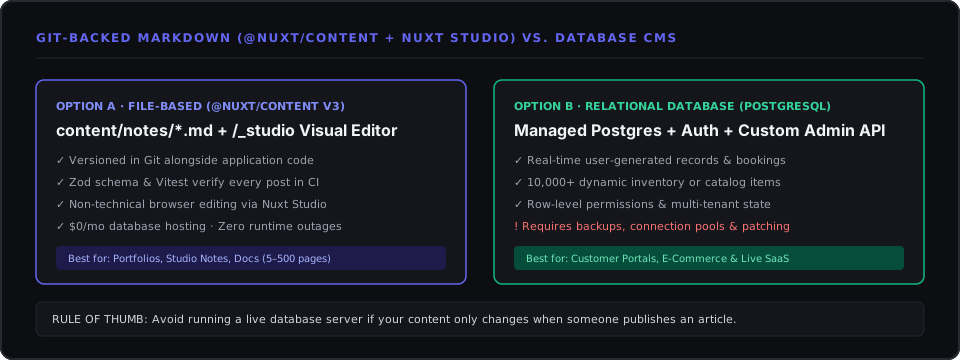
You see, the right choice depends on one practical question: Does your data change only when an author publishes an article, or does it change every minute while customers interact with the site?
| What Matters to You | File-Based Markdown (@nuxt/content + Nuxt Studio) | Hosted Headless CMS (Sanity / Strapi / Contentful) | Custom Database (PostgreSQL + Admin Portal) |
|---|---|---|---|
| How You Edit Content | Visual browser editor at /_studio OR directly in code; full undo history on every line. | Cloud dashboard with user roles; triggers webhooks to update the site. | Custom admin forms built specifically for your business workflows. |
| What Can Break at 2 AM? | Almost nothing—articles are pre-packaged with the site at build time. | Third-party API outages, expired tokens, or rate limits. | Database connection limits, server updates, and backup maintenance. |
| Quality Protection | Broken fields or missing images are blocked automatically by pnpm test before launch. | Editors can accidentally publish incomplete fields unless custom webhooks check them. | Protected by database constraints and server-side Zod validation. |
| Monthly Running Cost | $0 / month (included in standard web hosting). | $0–$99+ / month once you add team seats or traffic. | $15–$60+ / month for managed database hosting and backups. |
I felt relieved once this site's entire blog was consolidated into content/notes/*.md: pages load instantaneously, backups are automatic in Git, and there is zero database maintenance overhead.
- Choose File-Based Markdown (
@nuxt/content+nuxt-studio) for company blogs, case studies, documentation, and service pages (5 to 500 articles) where speed, zero monthly fees, and simplicity win. - Choose a Relational Database (
PostgreSQL) when customers create records live on the site (appointment bookings, user accounts, order history, or 10,000+ searchable product SKUs).
Working on something similar?
Tell me about it